Electronic Signature Activation in Kuwait: 2026 Guide
E-Signature Activation Helper
Answer a few questions to see where you can activate Kuwait’s approved electronic signature and what to bring.
Nothing you enter leaves this page. This is a guide only; PACI and the Kuwait Mobile ID app decide your signature status.
Kuwait’s approved electronic signature lets you sign documents and approve transactions from your phone, with the same legal weight as a handwritten signature. It lives inside the Kuwait Mobile ID app (Hawyti) from the Public Authority for Civil Information (PACI), and in August 2026 the Ministry of Justice (MOJ) and PACI asked every citizen and resident to activate it before new services arrive.
I compared PACI’s Kuwait Mobile ID help pages, the joint MOJ and PACI statement, KUNA, Kuwait Times and Arab Times reports and the guides people share, then put the activation steps in one place. If you only need to know whether your card is ready, use our Civil ID status checker instead. This guide explains what the signature is, whether it is legally valid, how citizens activate it in the app, how residents activate it at a PACI self-service kiosk, which services use it, and how to fix PIN and phone problems.
Table of Contents
Popular Civil ID guides
Quick answers to the most common Kuwait Civil ID and PACI questions.
What Is the Approved Electronic Signature in Kuwait?
The approved electronic signature is a digital signature issued through Kuwait Mobile ID and linked to your civil number. When a service asks you to sign, the request appears in the app, and you confirm it on your own phone instead of signing paper.
It is different from the everyday login approval (authentication) that you use for Sahel. Authentication proves who you are. The electronic signature goes further: it signs a specific document or transaction, so it can be used for contracts, powers of attorney and official requests. PACI’s own help pages list “Digital Signature” as a feature of the top account level only.
Is an Electronic Signature Legally Valid in Kuwait?
Yes. The MOJ and PACI said on 3 August 2026 that the approved electronic signature has full legal validity under Kuwait’s laws. The main law is Law No. 20 of 2014 on Electronic Transactions, which was amended by Decree-Law No. 148 of 2025, published in the Official Gazette on 23 October 2025.
Under the amended law, a protected electronic signature must:
- Identify the person who signs.
- Be linked only to that person.
- Be created with a secure tool under the signer’s sole control.
- Show any change made to the signed data after signing.
Some legal summaries list matters that may still need paper or in-person steps, such as real estate title deeds. The 2025 amendment widened the scope, and sources differ on the remaining exceptions, so check with the ministry for property or family matters.
Who Needs to Activate the Electronic Signature?
Officials asked both Kuwaitis and expats to activate it in advance. You will need it if you plan to:
- Issue or cancel a power of attorney online at the MOJ.
- Use electronic notarization as it rolls out.
- Set up a company or handle a commercial licence at the Ministry of Commerce and Industry (MOCI).
- Sign selected bank contracts remotely, such as financing at some banks.
If you only log in to Sahel and approve transfers, the High level of Kuwait Mobile ID is enough. Activating the signature early still saves a trip later.
Electronic Signature vs Authentication: Mobile ID Levels
Your Kuwait Mobile ID account has a level, and only the top level can sign.
| Level | How you get it | Can it sign? |
|---|---|---|
| Medium | Manual registration in the app | No, and no logins either |
| High | NFC registration in the app | No, but it approves logins |
| Verified (Qualified) | Kiosk enrollment (citizens can also activate signing in the app since July 2026) | Yes |
PACI’s help pages call the top level “Qualified”, while news reports since 2024 call it “Verified”. They mean the same level: digital signature plus strong authentication.
What You Need Before You Activate
- A valid smart Civil ID card. PACI’s help pages say kiosk registration needs a valid smart card, so renew an expired card first.
- Your passport, for citizens using in-app activation.
- The latest version of Kuwait Mobile ID on your own phone (Android 8 or later, or iOS 13 or later, per PACI).
- Access to the mobile number linked to your Civil ID.
- Your Kuwait Mobile ID PIN.
If you have not registered Kuwait Mobile ID yet, follow our Kuwait Mobile ID registration guide first, then come back to activate the signature.
How Citizens Activate the E-Signature in the App
Since 9 July 2026, PACI lets Kuwaiti citizens activate the electronic signature directly in Kuwait Mobile ID, with no kiosk visit. This first phase is for citizens only; PACI said other groups will follow in later phases. PACI has not published fixed button names, so follow the screens in your version:
Prefer to watch? This short video shows a document signed with Kuwait Mobile ID:
- Step 1 Update Kuwait Mobile ID from the App Store, Google Play or AppGallery.
- Step 2 Open the app and enter your PIN.
- Step 3 Open the side menu and choose the electronic signature activation option.
- Step 4 Confirm your details using your valid Civil ID and passport, as the app asks.
- Step 5 Complete any selfie check or SMS one-time password the app shows.
- Step 6 Read and accept the terms, then finish and check that the signature shows as active.
Al-Rai reported that 7659 users had activated the signature in the app within a week, and that some first had to update their registration data. If the option does not appear, update your card data in the app and try again.
How Residents Activate the E-Signature at a PACI Kiosk (Step by Step)
Residents (and citizens who prefer it) activate the signature at a PACI Mobile ID self-service kiosk. Enrolling at a kiosk gives your account the Verified (Qualified) level.
- Step 1 Open Kuwait Mobile ID and use the kiosk locator to find the nearest PACI self-service kiosk.
- Step 2 Go to the kiosk with your valid smart Civil ID and the phone that has the app.
- Step 3 Choose the Mobile ID enrollment option on the kiosk screen.
- Step 4 Use your Civil ID card as the kiosk asks and follow the identity checks.
- Step 5 Complete the steps on your phone when the kiosk tells you to, and set or confirm your PIN.
- Step 6 Check in the app that your account now shows the signature feature.
Bank kiosks follow branch hours, so go during the working day.
Where to Find E-Signature Kiosks
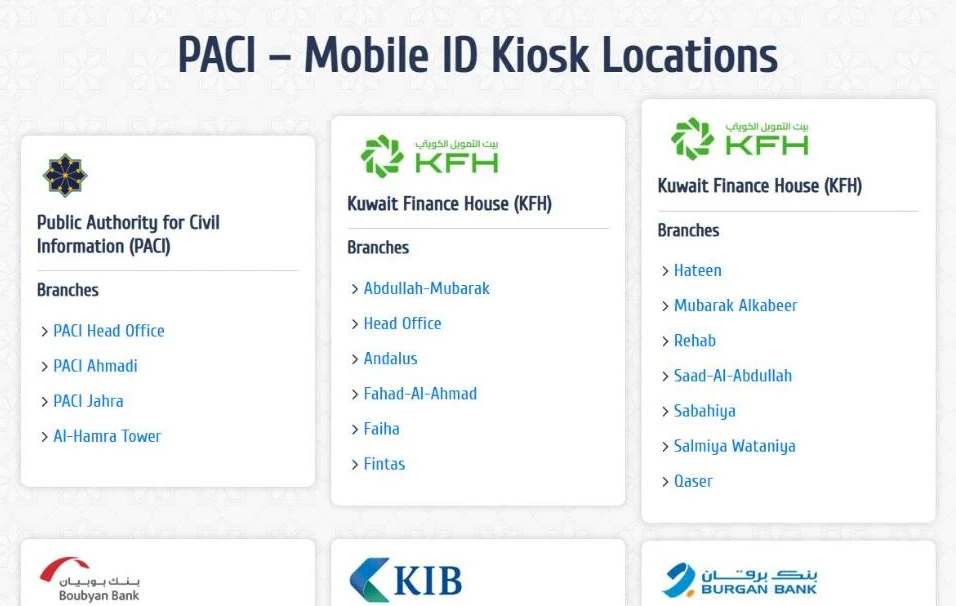
PACI lists Mobile ID kiosks at its head office in South Surra and in branches of several banks:
| Location | Examples from PACI and bank lists |
|---|---|
| PACI head office | South Surra |
| KFH | 10 branches with PACI kiosks, including Fintas, Salwa and Al Rehab |
| NBK | Head Office, Avenues, NBK Tower |
| ABK | Head Office, Jabriya, Fahaheel |
| Other banks | Boubyan, KIB, Burgan, Al Rajhi, CBK branches |
Lists change, so check the kiosk locator in the app before you go. Ministry of Justice kiosks are a separate service and do not activate the signature.
Services That Use the Electronic Signature
The MOJ and PACI said the signature will support a growing list of services, introduced gradually:
- Ministry of Justice: electronic notarization, and issuing and cancelling powers of attorney online.
- Companies: setting up companies and institutions remotely.
- MOCI: commercial licensing procedures.
- Banks: selected banking transactions and contracts. KFH, for example, uses it for remote signing of financing requests through KFH Online.
Expect more services to appear in Sahel and ministry apps over time.
Electronic Powers of Attorney at the Ministry of Justice
In July 2026, the Justice Minister issued new regulations for documentation (notarization). They allow three methods: in person before a notary, by audio and video call, and through a new automated electronic system.
- The automated system covers only powers of attorney for routine administrative procedures.
- It excludes acts that transfer ownership, create real rights or impose legal obligations on you.
- It uses Kuwait Mobile ID and the PACI approved electronic signature.
- Each document carries a verification code that can be checked on the MOJ platform.
- A power of attorney is generally valid for up to five years, and the expiry date must be stated.
Signing a Document: How a Request Works
When a service needs your signature, a request appears in Kuwait Mobile ID. Before you confirm:
- Check that you started the request on that service in the last few minutes.
- Read the provider name and what you are signing.
- Confirm with your PIN only if everything matches.
Reject anything you do not recognise. A signature is stronger than a login approval, so a mistake costs more.
Your PIN: Change, Forgot and Locked PIN
Your PIN protects every signature. PACI’s help pages explain:
- Change PIN: side menu, then Settings and Security, then Change PIN.
- Forgot or locked PIN (app registration): use Reset PIN on the login screen or Unlock PIN in Settings and Security.
- Locked PIN (kiosk or Qualified level): visit the nearest PACI kiosk or service centre to unlock it.
Choose a PIN that is not your birth year or 1234, and never share it.
Changing Phones, Lost Phones and Cancelling
Kuwait Mobile ID works on one phone at a time. Registering on a new phone automatically revokes the old one, which also protects you if a phone is lost or stolen. After you register on the new phone, activate the signature again: citizens in the app, residents at a kiosk.
You can cancel your Mobile ID under Settings and Security (Cancel Mobile ID) or at a kiosk. Cancel it on the old phone before you sell or give it away.
Common Electronic Signature Problems and Fixes
| Problem | Fix |
|---|---|
| No signature option in the app (resident) | Residents activate at a PACI kiosk for now |
| No signature option in the app (citizen) | Update the app and your card data, then try again |
| Kiosk will not accept the card | Use a valid smart Civil ID; renew an expired card first |
| Incorrect data error | Check your details; PACI says to validate them with MOI |
| PIN locked after kiosk enrollment | Unlock it at a PACI kiosk or service centre |
| Signature missing after a new phone | Activate the signature again on the new phone |
| Signing request not received | Check that you started it on the right account and phone |
| Service rejects your signature | Check that your account shows the top level |
If a problem stays, call the PACI hotline 1889988. For an expired card, follow our Civil ID renewal guide first.
Tips for Using Your Electronic Signature Safely
- Activate the signature before you need it.
- Keep your Civil ID valid.
- Read every request before you sign.
- Sign only what you started yourself.
- Never share your PIN or SMS codes.
- Lock your phone with a PIN or fingerprint.
- Cancel Mobile ID on an old phone.
- Keep the app updated.
Once activated, the signature works with the Sahel app. Official guidance is on the PACI website.
More Civil ID and PACI guides
Every guide on the site, in one place.
FAQs About Kuwait Electronic Signature Activation
What is the approved electronic signature in Kuwait?
It is a digital signature issued by PACI through Kuwait Mobile ID. It lets you sign documents and approve transactions from your phone.
Is an electronic signature legal in Kuwait?
Yes. The MOJ and PACI say it has full legal validity, based on Law No. 20 of 2014 on Electronic Transactions as amended in 2025.
How do citizens activate the electronic signature?
Since July 2026, citizens can activate it in Kuwait Mobile ID with a valid Civil ID and passport, or at a PACI self-service kiosk.
How do expats activate the electronic signature?
Residents activate it at PACI self-service kiosks across Kuwait. In-app activation is limited to citizens in the first phase.
Is the electronic signature free?
PACI and MOJ announcements do not mention any fee for activating it.
What is the Qualified or Verified level?
It is the top Kuwait Mobile ID level. It adds the electronic signature to strong authentication, and PACI gives it through kiosk enrollment.
Can I sign with the High level?
No. The High level approves logins only. You need the Verified (Qualified) level to sign.
Where are the e-signature kiosks?
At PACI head office in South Surra and in branches of banks such as KFH, NBK, ABK, Boubyan, KIB, Burgan, Al Rajhi and CBK.
What services use the electronic signature?
MOJ notarization and powers of attorney, company setup, MOCI commercial licensing and selected bank contracts.
What if my PIN is locked?
If you enrolled at a kiosk, unlock it at a PACI kiosk or service centre. App users can use Reset PIN or Unlock PIN.
Do I need to activate it again on a new phone?
Yes. Kuwait Mobile ID works on one phone, so register on the new phone and activate the signature again.
Can I make a power of attorney online with the e-signature?
Yes, for routine administrative powers of attorney through the MOJ automated system. Acts that transfer ownership still need other methods.
Conclusion
The approved electronic signature is quick to set up and will be needed for more services each year, so activate it before you need it. Here is the short version:
| If you want to | Do this |
|---|---|
| Activate as a citizen | Use Kuwait Mobile ID with your Civil ID and passport |
| Activate as a resident | Visit a PACI self-service kiosk |
| Make a power of attorney online | Use the MOJ automated system with your signature |
| Unlock a locked PIN | Go to a PACI kiosk or service centre |
- Keep your Civil ID valid, because activation needs a valid smart card.
- Sign only what you started, and never share your PIN.
- Reactivate on a new phone, since Mobile ID works on one device.
Rules and app screens change as the rollout continues, so confirm the latest steps in the app and on PACI’s pages. I based this guide on PACI pages and MOJ statements plus news references, last checked in October 2026.
Find Your Activation Route
Validate your Civil ID number and see whether to activate the e-signature in the app or at a PACI kiosk.