Kuwait Civil ID Status Check Online 2026 (PACI Services)
Kuwait Civil ID Status Check Online
Choose a service, enter your Civil ID or envelope number, and go to the official PACI page with your number ready to paste.
Your number stays on this page. Nothing is sent or saved.
Popular guides
Applied for a new Kuwait Civil ID or renewed your old one, and still waiting to hear whether it is ready? You can check your Kuwait Civil ID status online in a few minutes with your Civil ID number or envelope number, with no office visit or appointment needed.
Use the checker above to confirm your number and open the official PACI Card Status page. The result tells you whether your card is ready and, when available, the collection location and machine number, so you know exactly where to go before you leave home.
In this guide, you will find every official way to check (PACI, Kuwait Government Online, Sahel, phone and SMS), what each status result means, and what to do if your status does not appear.
Table of Contents
While checking the official PACI pages for this guide, I noticed that Card Status and Card Validity are separate inquiries. I’ve kept those steps separate below so you can choose the one that matches what you need.
Popular Civil ID guides
Quick answers to the most common Kuwait Civil ID and PACI questions.
How to Check Kuwait Civil ID Status Online Through PACI
Checking your Civil ID status on the official PACI website takes only a few minutes. Follow these seven steps in order. The screenshots show what you will see on the PACI page at each step.
Prefer to watch? See the whole process in this short video:
Step 1 Open the official PACI services website.
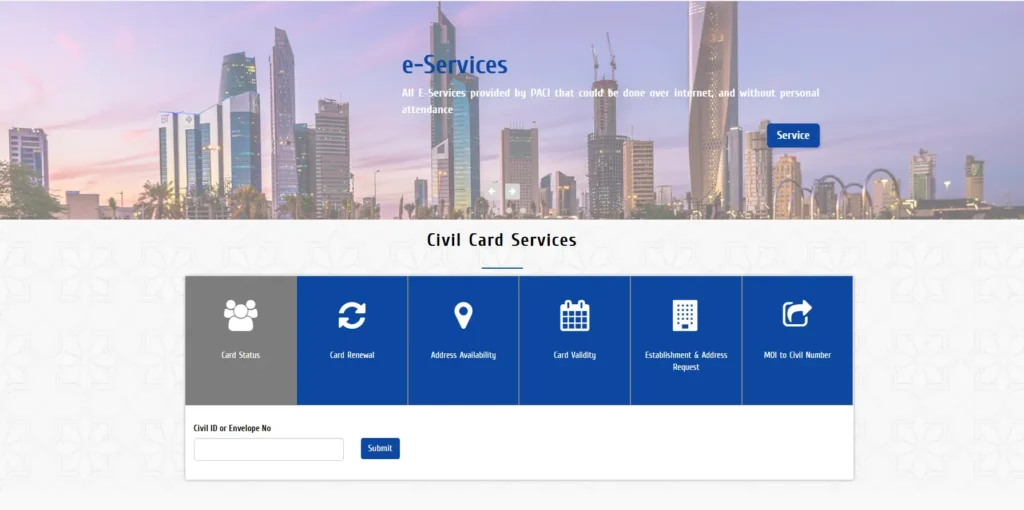
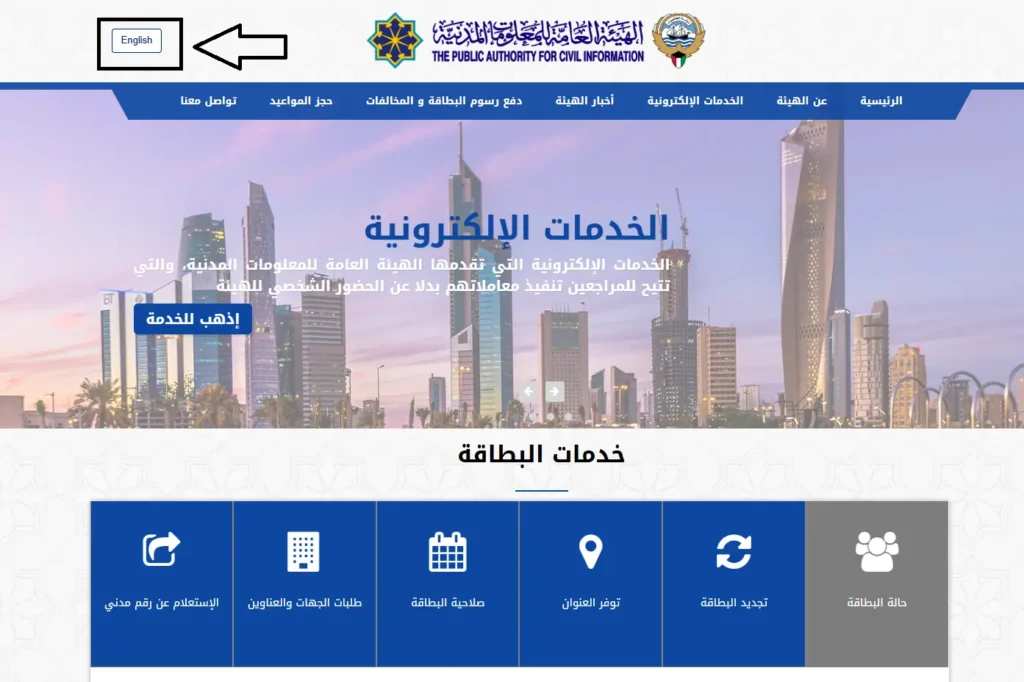
Step 2 If the page opens in Arabic, select English from the language option at the top.
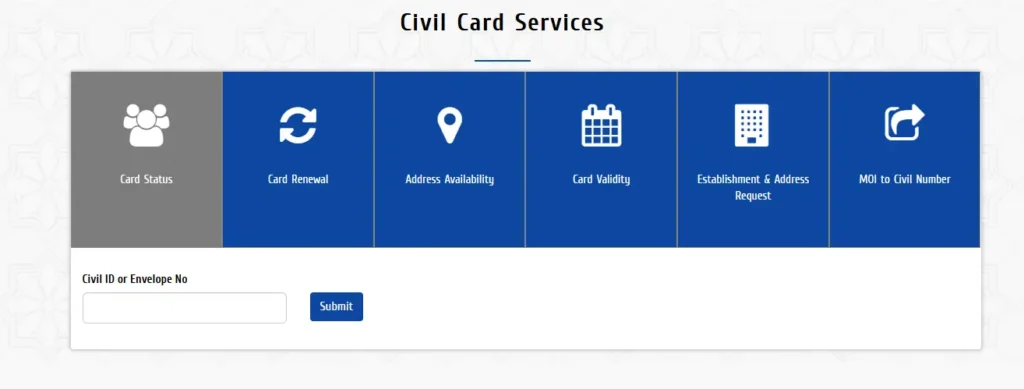
Step 3 Find the Civil Card Services section.
Step 4 Select Card Status.
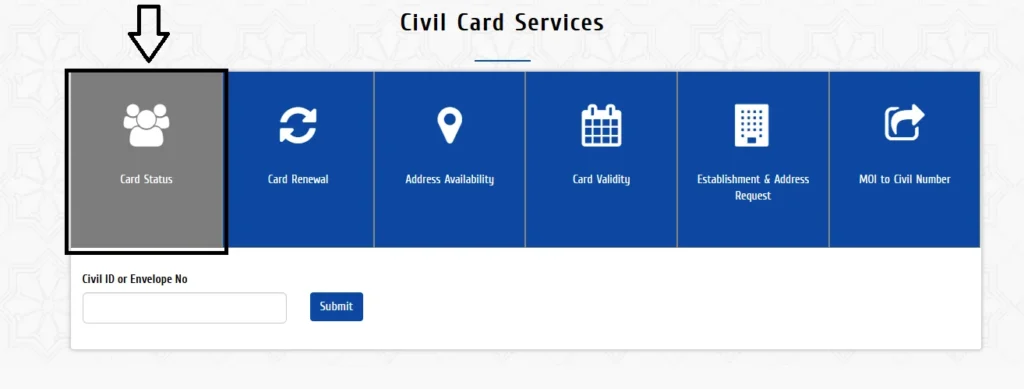
Step 5 Enter your Civil ID number or envelope number in the Civil ID or Envelope No field.
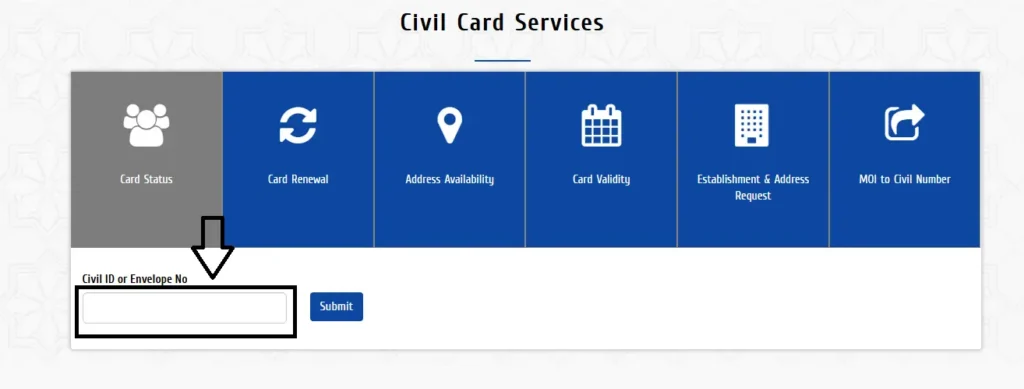
Step 6 Select Submit or the inquiry button.
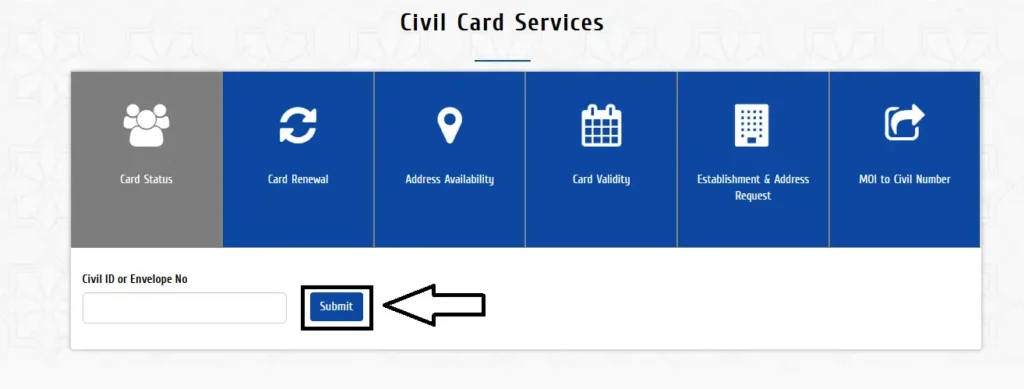
Step 7 Read the result and follow any collection or service instructions displayed.
PACI lists Card Status separately from Card Validity and provides Civil ID or receipt-number inquiry fields on its services page.
How to Check Through Kuwait Government Online
You can also check your card through the official Kuwait Government Online Civil ID Status service. It can show whether your card is ready, along with the collection location and machine number.
Step 1 Open the Civil ID Status service.
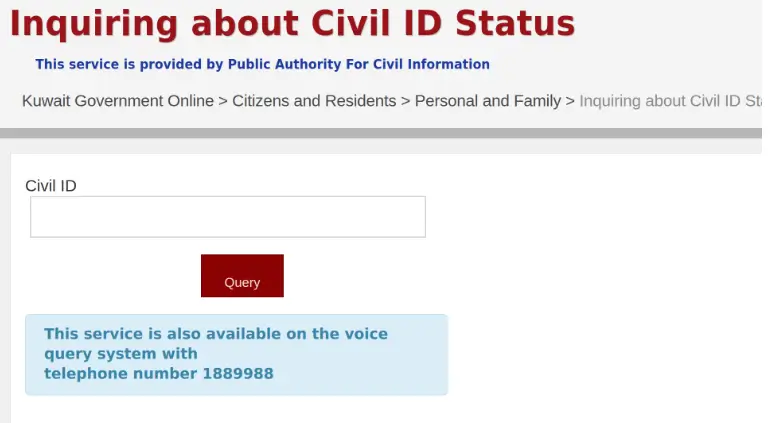
- Step 2 Select Start eService.
- Step 3 Enter the information requested by the service.
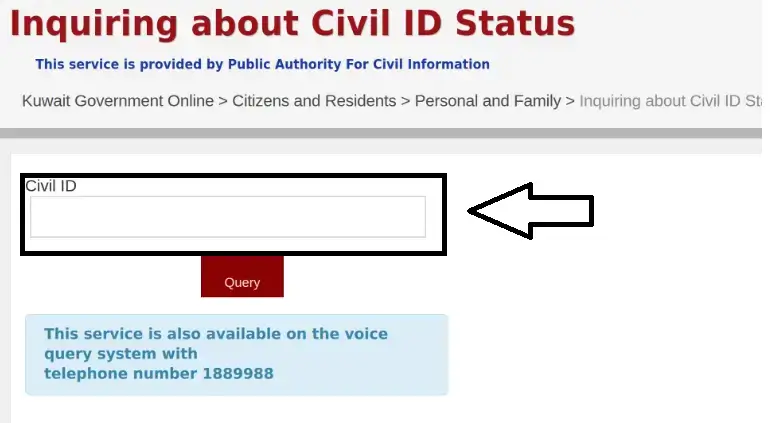
- Step 4 Submit the inquiry and read the result.
- Step 5 If the card is ready, check the collection details shown.
The service may show whether the card is ready, along with a machine number and collection location.
Other Ways to Check Your Status
No internet, or prefer an app? There are several other ways to check. App menus, phone, and SMS instructions can change. Follow current directions from PACI, the official app, or your mobile operator.
| Method | What to know |
|---|---|
| Sahel App | Check whether PACI’s Card Status service is available in your version of the app. |
| Kuwait Mobile ID | Hawyti provides a digital identity; it may not track a physical Civil ID card request. |
| Calling PACI | Call 1889988 and follow the voice prompts. Menu options may change. |
| Civil ID Status by SMS | Send the relevant inquiry code and number to 1889988. Check current codes and SMS charges with PACI or your mobile operator. |
| PACI Service Center | Visit for in-person assistance. Check the location, working hours, and appointment requirements first. |
Checking Through the Sahel App
Sahel is Kuwait’s unified government services app. If the PACI Card Status service is available in your version of the app, you can use these steps to check your Civil ID request:
- Download the official Sahel app for Android or Sahel app for iPhone.
- Open the app and sign in using the authentication method shown on screen. If prompted, approve the sign-in through Kuwait Mobile ID.
- Tap Services on the home screen.
- Select the Public Authority for Civil Information (PACI).
- Open Individual Services.
- Choose Card Status, if it appears in the service list.
- Enter your Civil ID number or envelope/receipt number, as requested.
- Submit the inquiry and review the status and any instructions shown.
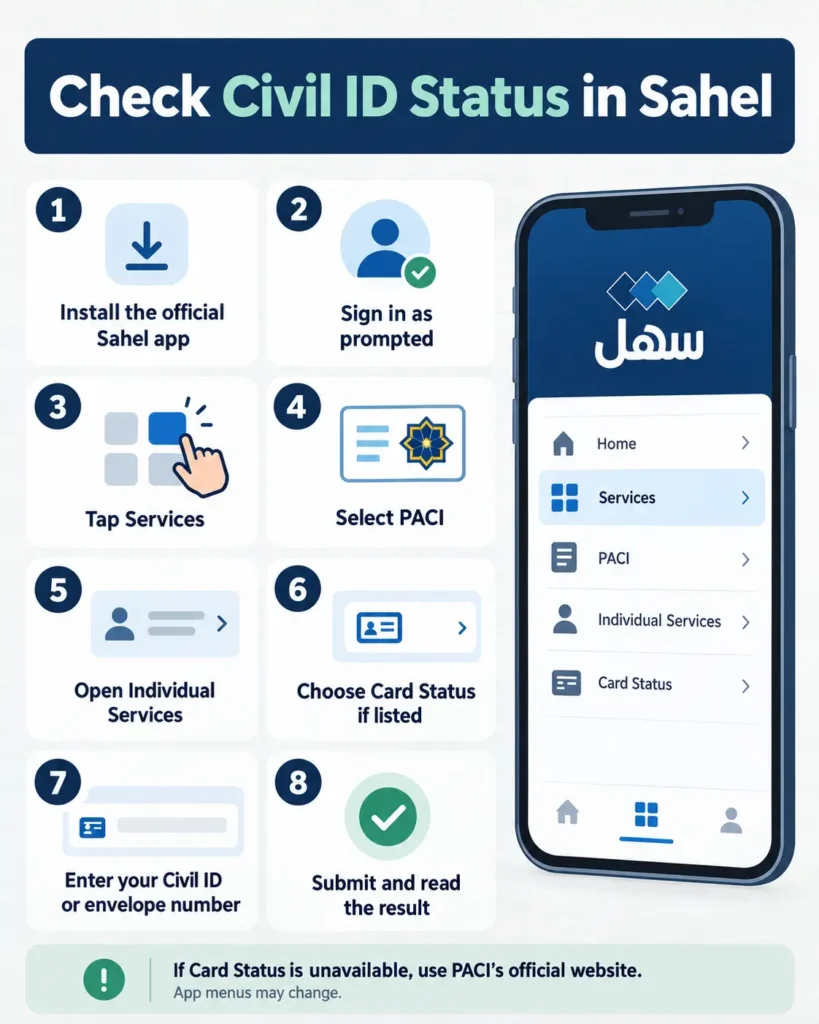
Sahel’s service names or menu layout may change after an app update. If Card Status does not appear, check through the official PACI services website. The Sahel app is listed as Kuwait’s unified government e-services app, while PACI’s website provides the card-status inquiry.
Using Kuwait Mobile ID/Hawyti
Kuwait Mobile ID, also called Hawyti, lets citizens and residents use a digital version of their Civil ID for identity verification and online services. It also carries the electronic signature once activated. Registering for Hawyti is different from checking whether a newly issued or renewed physical card is ready.
To activate your Mobile ID:
- Download the official Kuwait Mobile ID app from the Google Play Store or Apple App Store.
- Open the app and select Online Registration using Mobile.
- Enter the requested details, including your Civil ID number, card serial number or Mobile ID serial number, email address, and mobile number. Non-Kuwaiti applicants may also be asked for a passport number.
- If this is your first Civil ID application, use the Mobile ID serial number PACI sent by SMS after you paid the issuance fee.
- Confirm your details, tap Next, take a clear selfie for identity verification, and submit the request.
- Enter the one-time password sent to your mobile number.
- Choose a PIN and confirm it to complete registration. Your Mobile ID should then appear in the app.
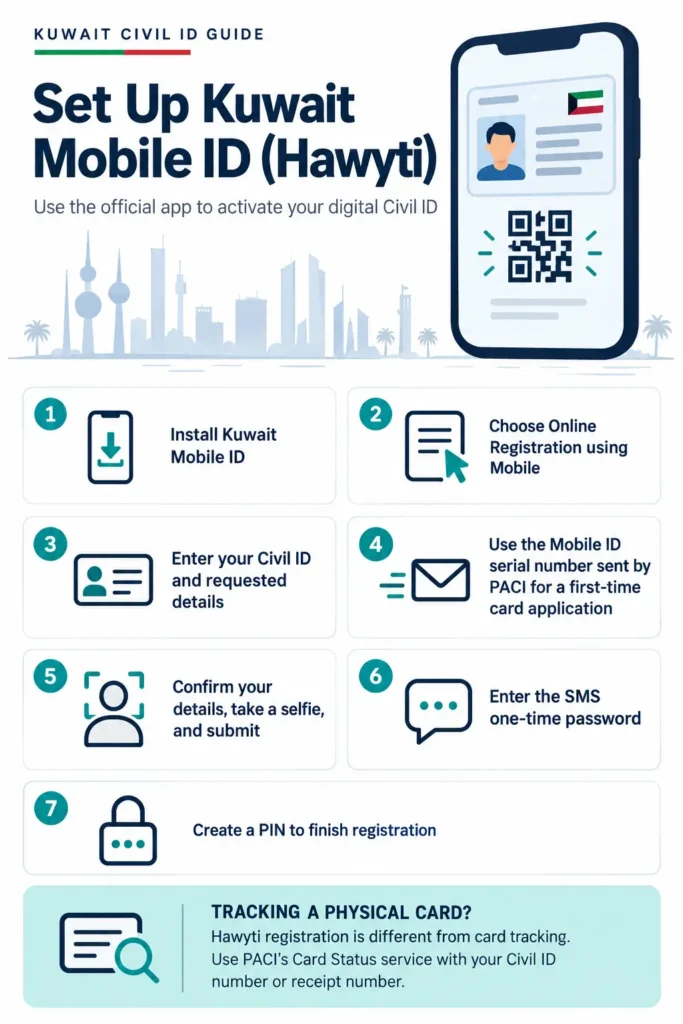
To check the physical Civil ID card’s status, use PACI’s official services portal. Open Card Status, enter your Civil ID number or receipt number, and submit the inquiry. PACI lists card status as a separate service from Kuwait Mobile ID.
Checking Civil ID Status by Calling PACI
If you do not have internet access, you can call PACI’s automated service at 1889988 to make a Civil ID inquiry. Keep your Civil ID number ready before calling.
- Dial 1889988 from your phone.
- Listen to the voice menu and choose your preferred language, if prompted.
- Follow the instructions for Civil ID services.
- Enter your Civil ID number using your phone keypad.
- Listen to the status information provided by the automated service.
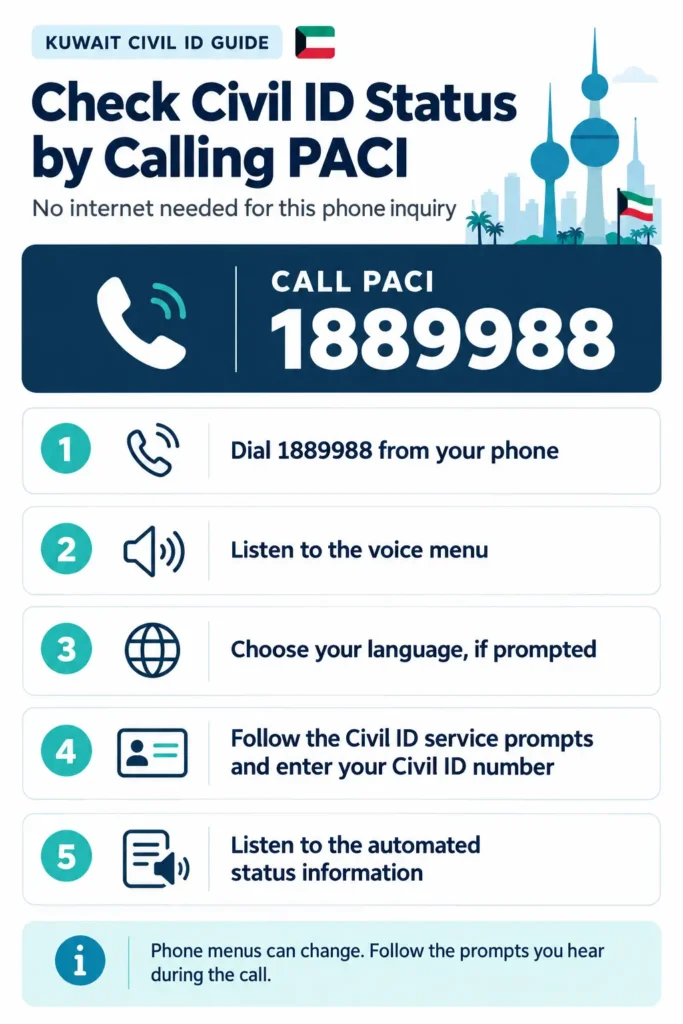
The phone menu can change, so follow the prompts you hear during the call. Kuwait Government Online lists 1889988 as a channel for PACI’s automated Civil ID renewal service.
Checking Civil ID Status by SMS
You can use SMS to make PACI inquiries without opening a website or app. The message format depends on what you want to check:
| Inquiry | SMS format | Send to |
|---|---|---|
| General Civil ID inquiry | I [Civil ID number] | 1889988 |
| Renewal inquiry | R [Civil ID number] | 1889988 |
| Envelope inquiry | E [receipt number] | 1889988 |
To send a message:
- Open the Messages app on your phone.
- Type the relevant letter, a space, and the required number. For example:
I 1234567890. - Send the SMS to 1889988.
- Check for PACI’s reply with the requested information.
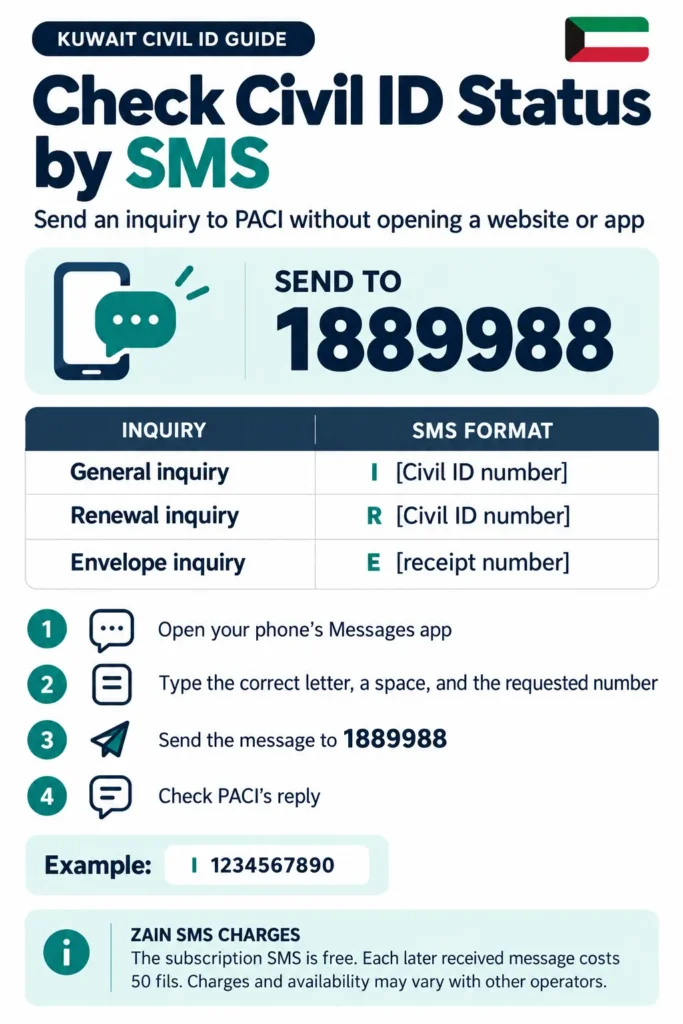
Zain Kuwait lists these formats for general, renewal, and envelope inquiries. Its service page says the subscription SMS is free, while each subsequent received message costs 50 fils. Charges or availability may differ by mobile operator, so check with your provider if you are unsure.
Visiting a PACI Service Center
Visit a PACI service center if you need in-person help or cannot resolve a Civil ID issue online. PACI lists its main office in South Surra, along with service locations in South Sabahiya, Jahra, Liberation Tower, and selected Government Malls. The available services and working hours differ by location; card collection hours may also differ from public service hours.
Before you travel:
- Check PACI’s official contact page for center locations and current working hours.
- Check the Meta appointment portal to see whether your service requires an appointment. PACI links to Meta for appointments.
- Keep your Civil ID number and, if relevant, your receipt or envelope number ready.
- Bring your Civil ID or another valid ID, plus any documents related to the issue. Required documents depend on the service, so check PACI’s instructions before leaving.
- At the center, explain the issue to PACI staff and provide the relevant number or documents.
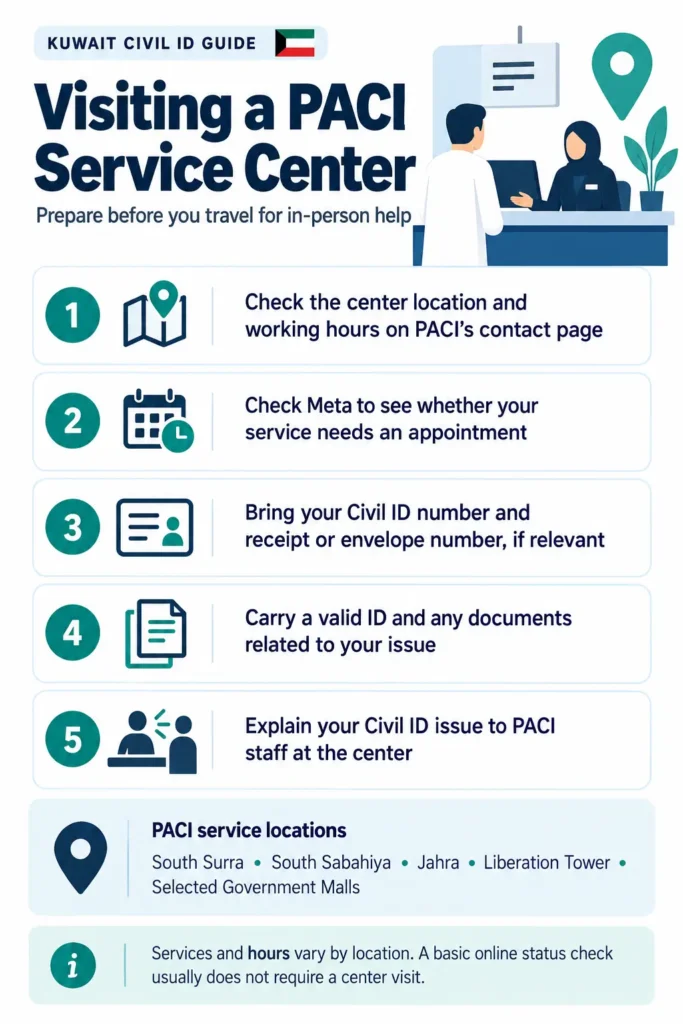
A center visit usually is not necessary for a basic online status inquiry. Go in person when you need staff assistance or PACI’s instructions say your request must be handled at a center.
What Does Your Civil ID Status Result Mean?
A PACI result may refer to your card’s validity or to the progress of a new or renewed card. First, check which inquiry you submitted. Kuwait Government Online lists Civil ID Status for checking card readiness, collection machine number, and collection location. Civil ID Validity is a separate inquiry.
Active
Active generally means the Civil ID is currently valid. Check the validity result and expiry date shown for your card. A validity result does not necessarily mean a new physical card is ready for collection.
Expired
Expired means the card’s validity period has ended. Check PACI’s renewal options and any instructions attached to your record. Don’t assume that seeing “Expired” automatically means you owe a 20 KD fine. PACI lists that fine for certain late registration or renewal cases, with deadlines that depend on the residency category.
Pending or In Process
This may indicate that a request is still being handled. Read the full PACI message to see whether it asks you to pay, provide information, or wait. If no action is requested, check the status again later.
Ready for Collection
This means that the card is ready to collect. Check the collection location and machine number shown in the official result, then follow PACI’s collection instructions. The government’s status inquiry specifically provides readiness, machine number, and collection location.
Payment Required
If PACI’s result says a fee is due, use PACI’s official payment service or the payment option specified in the notice. PACI’s terms state that applicable issuance fees must be paid before a card is printed.
Cancelled
A Cancelled result means the request may no longer be proceeding. This is different from Civil ID cancellation when you leave Kuwait for good. Check the notice for a reason or next step. If it is unclear, contact PACI through an official support channel before submitting another request.
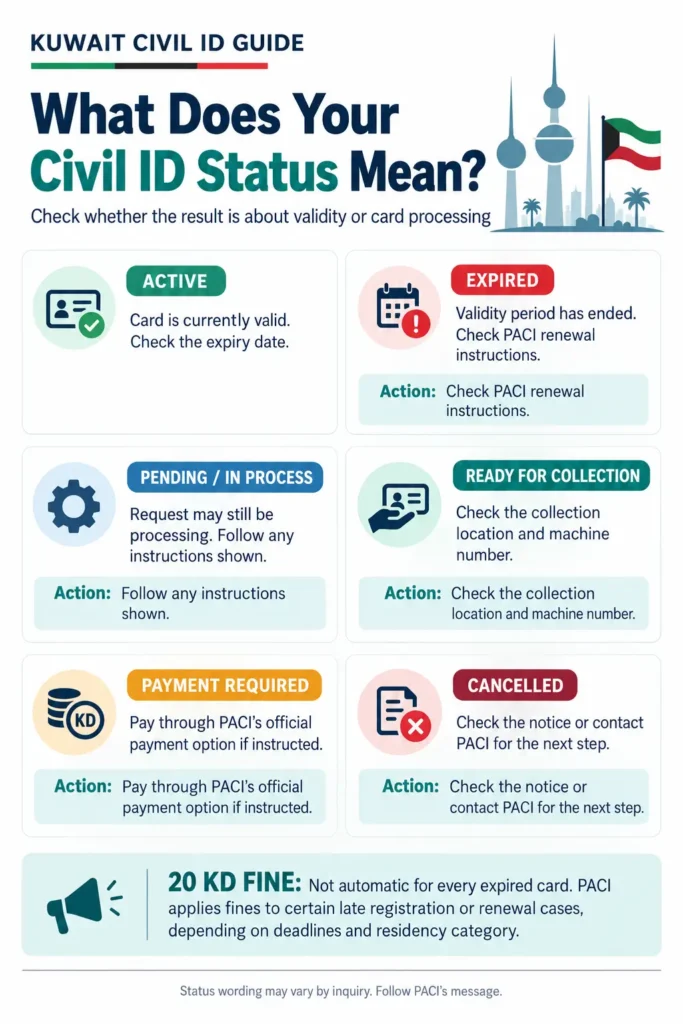
Note: The exact wording and available statuses can vary by inquiry. Follow the instructions displayed by PACI; contact the authority if a result is unclear or requires action.
Do You Need a PACI Appointment?
Short answer: No. You do not need an appointment to check your Civil ID status online. An appointment may be needed when you require an in-person PACI service; see our PACI appointment booking guide.
PACI links to Kuwait’s Meta appointment platform, which manages government appointments. Check PACI and Meta for current service options and instructions before booking. Do not assume that every Civil ID collection requires an appointment; follow the directions for your specific request.
How to Book a PACI Appointment Through Meta
- Open Meta using the appointment link on PACI’s website, or go to meta.e.gov.kw.
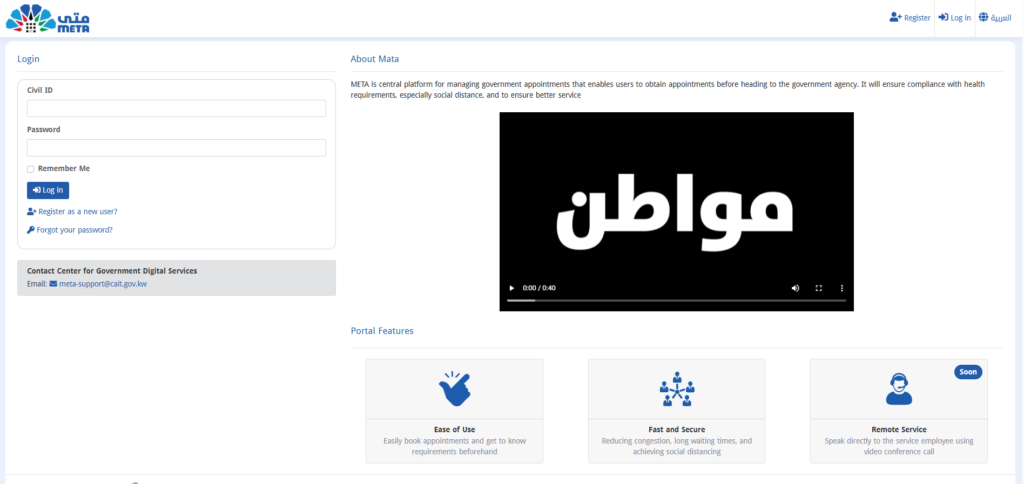
- Sign in or register if you do not already have an account.
- Look for PACI and the in-person service you need.
- Choose an available date, time, and location if the service offers them.
- Save the confirmation and review any requirements before travelling, including a Kuwait travel ban check, one of the MOI Kuwait online services.
The exact service names and appointment slots can change, so use the options currently displayed on Meta.
What Is Kuwait Civil ID Status?
The Kuwait Civil ID is an identity document issued through the Public Authority for Civil Information (PACI). A Civil ID status inquiry helps you check information about a card request, including whether the card is ready and, when provided, its collection details.
A status check does not submit a new application, renew a card, replace a lost card, or update personal information. Those are separate services.
| Inquiry | What it checks |
|---|---|
| Card Status | Whether a new or renewed card is ready, plus its collection location and machine number |
| Card Validity | Whether an existing Civil ID is still valid or has expired |
| Card Renewal | Not a status check: this service is where you request a Civil ID renewal |
Who Can Check Civil ID Status?
Anyone with a Civil ID request to follow can use the status service, whether you are a Kuwaiti citizen, a GCC citizen or an expatriate resident. It is most useful after:
- Applying for a new Civil ID, including a newborn Civil ID.
- Submitting a renewal or replacement request.
- Receiving an envelope or receipt number.
- Getting ready to collect a card.
Someone helping a cardholder should have permission to use their personal details. Check the official result before travelling to a service center or relying on an old screenshot or unofficial post.
What Do You Need to Check Your Civil ID Status?
You only need a few things for an online status check. Have the number requested by the official form ready:
- Civil ID number: the 12-digit number on your card, if the form asks for it.
- Envelope or receipt number: printed on your PACI receipt, if the service offers that option.
- A phone or computer: any device with internet access for the online inquiry.
A passport, recent photograph, proof of address, or power of attorney may be needed for a different application or in-person service. Don’t assume these are required just to check status. If you moved recently, our Kuwait Civil ID address change guide lists the documents PACI asks for.
Civil ID Status vs. Civil ID Validity
| Feature | Civil ID Card Status | Civil ID Card Validity |
|---|---|---|
| Purpose | Checks the progress or readiness of a new or renewed card request | Checks whether an existing Civil ID is valid |
| What you can learn | Whether the card is ready, plus the collection location and machine number | Whether the card is still valid or has expired |
| Use it when | You have applied for or renewed a card and want to know about collection | You want to confirm whether your current card is still valid |
| Information needed | Civil ID number or receipt number, as requested by PACI | Card serial number |
Kuwait Government Online describes Card Status as the service for checking readiness, machine number, and collection location. It lists Card Validity separately as an inquiry using the card’s serial number.
An expired-card result does not necessarily show the progress of a new or replacement request. If services stop working on a valid card, see why a Civil ID gets blocked. Choose the inquiry that matches what you need to check.
What to Do If the Status Does Not Appear
A blank result does not automatically mean PACI rejected or cancelled your application. Check the details you entered first, then try these steps:
| Problem | What to check and do |
|---|---|
| Incorrect Civil ID or receipt number | Compare the number you entered with your Civil ID or PACI receipt. Check each digit and make sure you selected the matching field. PACI’s service page accepts a Civil ID number or receipt number. |
| No result appears | Confirm that you selected the right inquiry. Card Status checks card readiness and collection details; Card Validity checks an existing card’s validity. Try the matching PACI service, then check again later if the page still shows no result. |
| PACI page is unavailable | Reload the official page after a while or try again using another browser or device. Avoid entering your personal details on a site you do not recognize. |
| The result is unclear | Read the whole message, including any payment, collection, or document instructions. If it still does not explain what to do, contact PACI through an official channel and have your Civil ID or receipt details ready. |
| Personal details do not match | Do not keep submitting different versions of your information. Contact PACI and ask which record or document needs correction. |
Do not assume an application has been rejected just because no result appears. Likewise, avoid relying on unofficial estimates of processing times; follow the instructions shown by PACI.
Collection Location, Machine Number and What to Do Next
When your card is ready, the official Civil ID Status service can show its readiness, the machine number, and the collection location. Use the details displayed for your request rather than relying on an old address or collection guide.
Before you travel to collect your card:
- Confirm the location. Check the collection location shown in your result and make sure you know which branch or collection point it refers to.
- Check current collection hours. PACI lists separate schedules for card collection and public services, and hours can differ by location. Check the official contact page before you leave.
- Follow the instructions shown for your request. If PACI specifies a machine number, appointment, payment, or another requirement, follow that instruction. Do not assume every request uses the same collection process.
- Keep your details available. Bring or save your Civil ID number and relevant receipt or request reference. Keep any payment confirmation or PACI message related to the card.
- Check again if the information changes. If you are unsure whether the location or collection instructions are current, run the inquiry again through PACI before travelling.
Use Official Services and Protect Your Personal Information
Your Civil ID number and receipt details are personal information. Use them only on a service you have verified as official.
- Type the PACI or Kuwait Government Online address yourself, or use a trusted bookmark. Check the domain before entering any number, and learn to spot Civil ID scams.
- Use the official PACI services page or Kuwait Government Online for inquiries. PACI’s own page provides the card-status fields for a Civil ID or receipt number.
- Be cautious if an unfamiliar site asks for extra information, payment, a password, or a one-time code that is not requested by the official service.
- Do not post screenshots of your result publicly. They may show your Civil ID, receipt number, phone number, or other identifying details.
- If you use a third-party guide to find instructions, treat it as informational. A link or redirect from a third-party site does not make that site a government service.
- If you need to share a screenshot with PACI support, hide personal details that are not necessary to explain the issue.
What Is an Envelope Number?
An envelope number is the reference number linked to your Civil ID request. On PACI’s Card Status page, the field is labelled Civil ID or Envelope No, so you can track your card with either number. Some receipts and guides call the same reference a receipt number.
Civil ID number
The 12-digit number printed on the front of your Civil ID card.
Best for: checking an existing card or a renewal.
Envelope number
The reference printed on the PACI receipt you get when you apply.
Best for: tracking a new card you have not received yet.
Enter the number exactly as it appears on your PACI receipt or message. If you are not sure which number on the receipt is the envelope number, contact PACI before submitting the inquiry.
Why Check Your Civil ID Status?
Checking your Civil ID status helps you find out whether PACI has updated your card request and whether it has provided collection information or another instruction. The official status service can show whether the card is ready, its collection location, and a machine number when available. That can help you avoid travelling to a service center before you know what to do.
Know if your card is ready
See the latest update on a new or renewed card request.
Find where to collect it
Get the collection location and machine number when PACI provides them.
Save a wasted trip
Only travel to a service center once you know what to do.
A status check is also useful after you submit a renewal or issuance request, pay a required fee, or receive a PACI message asking you to check your card. Use the result shown by PACI to decide your next step. A missing result alone does not confirm that the application has been rejected.
Civil ID Status Check Documents
For a status check, you only need your Civil ID or envelope number. PACI’s Card Status page accepts either one. You do not need to upload a passport, photograph, proof of address, or power of attorney just to check a status.
Documents you may need for other PACI services (not for a status check):
- Passport: May be requested for some expatriate registration, renewal or data update transactions.
- Recent photograph: May be required for an issuance, renewal, or photo-update service, depending on the case.
- Proof of address: May apply to an address-change request, not a routine status inquiry.
- Power of attorney: May be needed when an authorized representative handles a service on someone else’s behalf.
- Other supporting documents: PACI may request documents specific to the transaction or the applicant’s record.
For example, PACI’s expatriate renewal information lists a valid Civil ID number, passport, and residence stamp extract for that service. PACI’s address-change guidance lists address-related documents separately. These are examples of transaction requirements, not a standard checklist for everyone checking status. Always review the instructions for your exact service before applying or travelling.
Civil ID Validity, Expiry and Renewal
A validity inquiry and a card-status inquiry answer different questions. PACI’s Civil ID Validity service checks the validity of an existing card using its serial number. The Civil ID Status service is for card readiness and collection details.
If your card is expired, check PACI’s renewal instructions and the information attached to your record. Do not assume every Civil ID has the same validity period or that all holders can use the same renewal procedure. The required steps and documents can depend on the cardholder’s category and whether the application involves a photo update or another change.
PACI lists renewal channels that may include its website, the Sahel app, an in-person visit, a phone call, or SMS, depending on the service and eligibility. Use the renewal option PACI provides for your case, and check the fee and document requirements before submitting.
Need the full process? Our step-by-step guide to Kuwait Civil ID renewal online covers the PACI website, Sahel, phone and SMS, documents by category and what to do after you pay.
Processing Time, Collection Deadline and Fees
Processing times can vary by request and record. PACI’s public status inquiry focuses on whether a card is ready and, when available, where and how to collect it. Treat estimates such as 7 to 10 days or 7 working days as unofficial unless PACI gives that timeframe for your specific request. Check the status service for updates instead of planning around a third-party estimate.
6 months
To collect a printed card before it may be destroyed
5 KD
Listed for certain standard renewal services
20 KD
Fine in certain late registration or renewal cases only
PACI’s terms state that a card not collected within six months from its printing date may be destroyed. In that case, the person may need to submit another issuance or renewal request and pay the applicable fee again. If your result says the card is ready, check the collection instructions and arrange collection as soon as practical.
Fees depend on the transaction. PACI currently lists 5 KD for certain standard renewal services; replacement of a lost or damaged card is a separate service with its own fee. A late-registration fine is also different from a renewal fee: PACI lists a 20 KD fine for certain late-registration or renewal cases after specified deadlines, which vary by residency category. Don’t assume that every expired card automatically incurs this fine. To see whether you owe anything, follow our Kuwait Civil ID fine check guide.
| Payment or charge | What to keep in mind |
|---|---|
| Renewal fee | Check the fee shown for your renewal service; some standard renewal services list 5 KD. |
| Lost or damaged card replacement | This is a separate transaction, and its fee may differ from a standard renewal. |
| Late-registration fine | A 20 KD fine applies to certain cases after the relevant deadline; it is not an automatic charge for every expired card. |
| SMS inquiry charge | If you use SMS, check the charge stated by PACI or your mobile operator. |
Before paying, confirm the amount through PACI’s official payment service and save the payment receipt. A payment request, an expired-card result, and a late-registration fine are separate matters; follow the specific message shown for your Civil ID.
Essential Tips for Checking Your Civil ID Status
I recommend starting with the right PACI service and keeping the number you need nearby. These small checks can save you from entering the wrong details or following instructions meant for a different Civil ID service.
Use an Official Service
For your inquiry, go directly to PACI Services or Kuwait Government Online. You can also check Sahel if the service you need appears in your version of the app.
A third-party website may explain how to check your status, but it cannot confirm or update your PACI record. Before entering your Civil ID or envelope number, check the website address and make sure you are on the official service you intended to use.
Keep the Number Requested by PACI Nearby
Have your Civil ID number or envelope (receipt) number ready before you begin. PACI’s Card Status page accepts either one, while the Card Validity check asks for your card’s serial number instead. I also recommend checking the digits once before submitting; a single incorrect number can prevent PACI from finding the right record.
Check Again Later if the Page Is Slow
If the PACI page is slow or temporarily unavailable, try reloading it or return to it later. Checking early in the morning or late at night is not guaranteed to make PACI process your request faster. The inquiry shows the information available in PACI’s system when you check.
Check Validity When a Service Requires It
If a bank, government service, or another provider asks for a valid Civil ID, check the card’s validity before you go or submit your request. If you are preparing to travel, check your passport, visa, exit permit and travel requirements separately. A Civil ID status result does not confirm that you are cleared to travel.
Follow the Renewal Deadline for Your Record
Check PACI’s renewal instructions before your card expires, and follow the deadline that applies to your case. A 20 KD fine does not automatically apply to every expired card. PACI lists fines for certain late registration or renewal cases, and the deadline can depend on the residency category.
Troubleshooting PACI Civil ID Status Check Issues
If your inquiry does not work, check what happened at each stage: entering your details, loading the service, submitting the request, and following the result.
The Civil ID or Envelope Number Is Not Accepted
Compare the number on screen with the number on your Civil ID or PACI receipt. Make sure you opened the right inquiry and entered the number in the matching field. If PACI still shows no result, check whether you meant to ask about card validity or card readiness; these are separate services.
The PACI Page Will Not Open
First, reload the official page and check your internet connection. If it still does not load, try an updated browser or another device, or return later. If you need help in the meantime, call 1889988 and follow the current voice prompts. Avoid entering your details on an unfamiliar site just because the PACI page is unavailable.
The Result Has Not Changed
A status may stay the same while information is being updated. PACI does not provide one guaranteed update time for every request, so avoid relying on a fixed 24- or 48-hour wait unless PACI has given that instruction for your case. Check the receipt or PACI message for a tracking reference, then use the service that matches your request.
The Page Works on Another Browser or Device
If the PACI page displays incorrectly, try a different, up-to-date browser or another device. You can also temporarily disable an extension that blocks page content, then reload PACI’s official page. If the issue continues only on PACI’s service, contact PACI rather than sending your personal details to another website.
The Application Shows Missing Information
Return to the service where you submitted the application and read the notice carefully. It may tell you which information or document is missing. Keep your application or tracking code nearby. For relevant transactions, PACI has a transaction-status service that asks for a tracking code and mobile number.
Your Personal Information Does Not Match
Check your details against your official documents. If they still do not match, avoid guessing at spellings or submitting the application repeatedly. Contact PACI and ask which record needs to be corrected. For general Civil ID issues, PACI directs users to 1889988. The MIDSupport email is for technical issues with the Kuwait Mobile ID app.
Your Payment Is Not Showing
Keep the payment confirmation or receipt and check PACI’s payment service before trying to pay again. If the payment still does not appear, contact PACI with your Civil ID number, transaction reference, receipt, and payment date. This gives PACI the details it may need to look into the payment.
Your Card Has Not Been Collected
When PACI marks your card as ready, check the collection location and instructions shown for your request. Confirm the latest collection hours before travelling. PACI’s terms state that a card left uncollected for six months after printing may be destroyed; you may then need to submit a new request and pay the applicable fee. Contact PACI if you are close to that deadline or think it has already passed.
Contact PACI for Civil ID Support
If the online result does not answer your question, contact PACI through the channel that fits your issue:
- PACI Services: services.paci.gov.kw
- Kuwait Government Online: e.gov.kw
- General Civil ID inquiries: Call 1889988 and follow the current prompts.
- General email: info@paci.gov.kw
- Kuwait Mobile ID app support: MIDSupport@paci.gov.kw is for technical issues with the Kuwait Mobile ID app. For other Civil ID matters, PACI directs users to call 1889988.
- In-person assistance: Check PACI’s contact page for current service-center locations, hours, and appointment instructions before you travel.
When you contact PACI, explain which service you used, what result appeared, and what you have already tried. Keep the relevant Civil ID or receipt reference and any payment confirmation nearby. Share personal details only through the official channel handling your request.
More Civil ID and PACI guides
Every guide on the site, in one place.
FAQs About Civil ID Status
How do I check my Kuwait Civil ID status online?
Use the checker at the top of this page, or open the PACI services website, select Card Status, enter your Civil ID or envelope number, and submit the inquiry. You can also use Kuwait Government Online.
How can I check whether my Civil ID card is ready?
Use the official Card Status inquiry. If your card is ready, the result shows the collection location and machine number.
Can I check Civil ID status with an envelope or receipt number?
Yes. PACI’s Card Status page has a single field labelled Civil ID or Envelope No, so you can enter either number. The envelope number is printed on the receipt you get when you apply.
Who can use the Civil ID status service?
Anyone following a Kuwait Civil ID request can use it, whether you are a Kuwaiti citizen or an expatriate resident, including domestic workers and family dependents. You only need your Civil ID or envelope number.
Do I need an appointment to check Civil ID status?
No. You can check online without an office appointment. An appointment may be needed for an in-person service; check PACI and Meta for current instructions.
When do I need to book an appointment with PACI?
Book one through the Meta portal when you need an in-person PACI service and its instructions require or offer an appointment. The online status check does not require an office visit.
Where do I collect my Civil ID if it is ready?
Go to the collection location and machine number shown in your official status result. Confirm current opening hours and any appointment instructions before travelling.
What should I do if the status does not appear?
Check that you entered the right number and chose the right inquiry, try the official service again later, and contact PACI if the result is still missing or unclear.
Can I check status without internet?
Yes. Call PACI’s automated service on 1889988, or send an SMS inquiry to the same number. Check your mobile operator for current SMS codes and charges.
Is Civil ID status the same as Civil ID validity?
No. Card Status tells you whether a new or renewed card is ready. Card Validity tells you whether your existing card is still valid. They are separate inquiries on PACI.
What does an expired or pending result mean?
Expired usually comes from a validity check and means the card’s validity period has ended. Pending usually means your card request is still being processed. Read the exact result and follow the instructions PACI shows.
How do I contact PACI for help?
Call PACI on 1889988, or use the contact details on PACI’s official website. See the “Contact PACI for Civil ID Support” section above for all channels.
Can I use Sahel or Kuwait Mobile ID to check the request?
Sahel may offer a PACI Card Status option, so check your version of the app. Kuwait Mobile ID (Hawyti) is a digital identity app and does not track a physical card request.
How many days does PACI take to process a Civil ID?
Processing time can vary by request. Some online guides mention 7 to 10 days or 7 working days, but PACI does not publish a fixed timeframe for every case, so check the status service for updates.
What happens if a printed card is not collected?
PACI’s terms state that a card not collected within six months of its printing date may be destroyed. You may then need to submit a new request and pay the fee again, so collect your card as soon as practical once it is ready.
What is the fee for a new or renewed Civil ID?
Fees depend on the service, as our Kuwait Civil ID fees guide shows. PACI currently lists 5 KD for certain standard renewal services, while replacing a lost or damaged card is a separate service with its own fee. Confirm the exact amount on PACI’s official payment service before you pay.
Is there a fine for late renewal?
PACI lists a 20 KD fine for certain late registration or renewal cases after the relevant deadline, which depends on your residency category. It does not apply automatically to every expired card, so check PACI’s rules for your situation.
Can a person check status using a passport number?
No. PACI’s Card Status form only asks for a Civil ID or Envelope No. It does not offer a passport-number option.
What are the Civil ID’s validity periods for different resident categories?
Validity depends on your record and residency details, which can change after a job change or residency transfer. For expatriates it is usually linked to the residence permit, so check your exact card with PACI’s Card Validity inquiry rather than relying on a general estimate.
Can a Civil ID be collected on Saturday?
It depends on the collection location. Check PACI’s current collection schedule on its contact page and the location shown in your result before you go.
How many digits are in a Kuwait Civil ID?
A Kuwait Civil ID number has 12 digits and is printed on the front of your card. Do not confuse it with your envelope (receipt) number, which is a different reference printed on your PACI receipt.
Conclusion
Checking your Kuwait Civil ID status online can help you find out whether your card is ready and review any collection details provided. Keep your Civil ID or envelope number handy, follow the instructions shown in the official inquiry, and check Card Validity separately if you need to confirm whether an existing card has expired. If you need an in-person PACI service, check its appointment requirements before you visit.
Ready to check your card?
Enter your Civil ID or envelope number in the checker and open the official PACI page in one click.
