Kuwait Civil ID Photo Requirements 2026: Size, Background, Update
Civil ID Photo Checker
Enter your photo details to see if it fits the rules quoted for PACI and Sahel uploads before you submit.
Nothing you enter leaves this page. Limits come from guides that quote the PACI forms; the form you see in Sahel or on PACI decides.
Your Civil ID photo is what airport officers, banks and clinics check against your face for years. The Public Authority for Civil Information (PACI) accepts a new photo when you renew, replace or simply update your card, and since July 2025 you can send it entirely online through the Sahel app. A photo that is the wrong size, has the wrong background or does not match your passport is the most common reason a request comes back.
I compared the official Kuwait Government Online pages, the PACI e-services list, news reports from 2025 and the guides and forum threads people in Kuwait rely on, then put the rules in one place. Where sources disagree, I say so. If you only need to know whether your card is printed, use our Civil ID status checker instead. This guide covers photo size, background, glasses and hijab, photos for children, the Sahel and PACI website steps, fees and the fixes for rejected photos.
Table of Contents
Popular Civil ID guides
Quick answers to the most common Kuwait Civil ID and PACI questions.
What Are the Kuwait Civil ID Photo Requirements?
The official Kuwait Government Online (e.gov.kw) renewal page lists the core rules for a Civil ID photo. They apply to Kuwaitis and expats alike:
- Recent coloured photos, not black and white.
- Size 4 x 6 cm for printed photos.
- Face length 2.2 to 2.5 cm, in the centre of the photo.
- No eyeglasses.
- No military uniform.
- No profile shots: the face must look straight at the camera.
- A background colour that does not affect the clarity of the photo.
Upload forms add limits on pixels, file size and format. PACI also offers a “Declaration of the Picture Authenticity Form” on the official non-Kuwaiti renewal page, which some counters ask you to sign.
Civil ID Photo Size and Dimensions (Print and Digital)
There are two sets of numbers: one for printed photos you hand in at a counter, and one for digital files you upload.
| Type | Requirement | Source |
|---|---|---|
| Printed photo | 4 x 6 cm (40 x 60 mm) | Official e.gov.kw page |
| Face length | 2.2 to 2.5 cm, centred | Official e.gov.kw page |
| Upload pixels | 500 x 750 pixels maximum | Two guides quoting the PACI form |
| Upload pixels (other claim) | 500 x 700 minimum, 800 x 1000 maximum | One guide, updated November 2025 |
| File size | 2 MB maximum | Two guides |
| File format | JPG, JPEG or PNG | Two guides |
Some travel and photo sites say 4 x 5 cm (40 x 50 mm). The official page says 4 x 6 cm, so use that. For uploads, a portrait photo of exactly 500 x 750 pixels in JPG fits every limit quoted above, and keeps the 2 to 3 ratio of a 4 x 6 print.
Background Colour: Blue, White or Plain?
This is where sources differ most. The official rule only says the background must not affect clarity. However:
- Most guides that quote the PACI upload forms say the photo must have a blue background.
- Users on a 2024 forum thread said their uploads were refused with the reason “not blue background”, and a light blue studio photo then passed.
- One 2026 guide claims only white is accepted now. I could not find any PACI announcement that confirms this.
The safe choice is a plain, even light blue background with no pattern, shadow or objects behind you. If the upload form you see asks for a different colour, follow the form.
Face, Pose and Lighting Rules
Guides that follow the PACI forms list the same pose rules you would expect for a passport:
- Face the camera directly with your head straight, not tilted.
- Keep your eyes fully open and your expression neutral.
- Your face and shoulders should be fully visible; one guide says the face should fill about 70 to 80 percent of the photo.
- Use even lighting with no shadows on the face or eyes.
- No filters, beauty apps or heavy editing.
- The photo should be recent; one guide sets the limit at 6 months.
Guides also say the photo should match your passport photo, because airline staff compare the two.
Glasses, Hijab and Dress Code
Glasses: The official rule says photos should be taken without eyeglasses. Sunglasses, tinted lenses and coloured contact lenses are refused in every guide. Take your glasses off for the photo even if you wear them every day.
Hijab and head coverings: Guides say a head covering worn for religious reasons is allowed as long as the whole face is visible, from the chin to the forehead. One guide adds that medical headwear is accepted on the same condition.
Clothing: Wear modest clothing that contrasts with the blue background. Military uniform is not allowed.
Photos for Children and Newborns
Children follow the same basic rules: plain background, face visible, no toys or hands in the frame. A few points are specific to children:
- Several guides tie photo rules to age 5. Replacement guides ask for photos for anyone aged 5 or older, and in December 2021 Sahel added a feature for adding a photo for those who have completed 5 years.
- The official newborn document lists do not include a photo, but one guide asks for two baby photos, so keep a clear photo ready.
- For babies, lay the child on a plain sheet and take the photo from above, with eyes open if possible.
Our newborn Civil ID guide covers the full registration steps for babies.
When You Need a New Civil ID Photo
These are the usual reasons for a photo update:
- Your appearance has changed a lot (a beard, weight change, surgery or simply age).
- Your Civil ID photo does not match your new passport photo.
- Your child has grown, and the baby photo no longer looks like them.
- You are renewing the card anyway and want a fresh photo.
- The photo on your card is faded or damaged.
If you are renewing, it costs nothing extra to change the photo during renewal, according to one 2026 guide.
Documents You Need for a Photo Update
The PACI photo update services ask for slightly different documents for Kuwaitis and expats.
| Applicant | Documents |
|---|---|
| Kuwaiti citizens | Recent colour photo, passport copy, Civil ID copy, and an official power of attorney (agency letter) if you do not apply in person |
| Expats (non-Kuwaitis) | Recent colour photo, passport data page copy, passport expiry page if separate, Civil ID copy, and an embassy-certified letter in some cases |
| Everyone online | Civil ID number, card serial number, a mobile number for the SMS code, and your blood type |
Guides say the embassy letter is needed when the new photo differs from the passport photo for “those who have completed five years”. Some read this as five years of age, others as five years in Kuwait.
How to Update Your Civil ID Photo in Sahel (Step by Step)
On 30 July 2025, PACI launched the photo update service in the Sahel app for citizens and residents, so you no longer need to visit a service centre. Log in to Sahel with Kuwait Mobile ID first.
Prefer to watch? This short video shows how to change your Civil ID photo in Sahel:
- Step 1 Open Sahel, tap Services, then Public Authority for Civil Information.
- Step 2 Open Individual Services (some guides call it Personal Services) and choose the option to add or update a personal photo.
- Step 3 Select your blood type if asked.
- Step 4 Upload your new photo and a copy of your Civil ID, plus your passport data page if requested.
- Step 5 Tap Submit and save the application number for tracking.
- Step 6 Wait for the review. If approved, pay the card fee through the link sent by SMS and collect the new card.
PACI reviews every request and notifies you when it is done.
How to Update Your Photo on the PACI Website
The PACI e-services site lists a Kuwaiti photo update, a non-Kuwaiti photo update and a photo update for residents in irregular status; guides also mention a GCC Photo Update. The flow is similar:
- Step 1 Open the photo update service for your category on the PACI e-services site.
- Step 2 Enter your civil number, card serial number and mobile number, then tap Next.
- Step 3 Enter the verification code sent by SMS and tap Next.
- Step 4 Choose your blood group, tap Browse next to each document and upload your files.
- Step 5 Tap Save. A message “Request sent successfully” appears, and you can Print it.
- Step 6 Follow the request through the SMS link from 1889988.
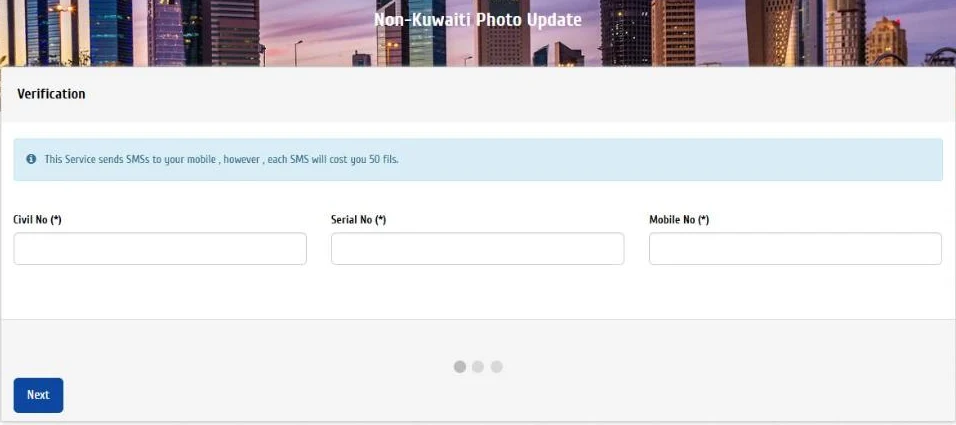
Photo Update Fees and Processing Time
Guides describe the cost as the fee for the new card that carries your new photo, not a charge for the photo itself.
| Item | Amount or time | Note |
|---|---|---|
| Photo change with a new card | 5 KD | Guides; paid by K-Net through the SMS link |
| Photo change during renewal | No extra fee | One 2026 guide; you pay the normal renewal fee |
| SMS updates | 50 fils per message received | One guide |
| Approval time | Hours to 3 working days | Guides and user reports |
| Longer estimate | 10 to 15 working days | One guide |
The July 2025 news reports did not mention a fee, so check the amount shown in Sahel before you pay.
Getting the New Card With Your New Photo
After approval, PACI prints a new card with the new photo. Users in 2024 reported about 3 working days for approval and 3 more for printing. You then collect the card from a PACI self-service machine, or at the counter if your case needs one. Once you have it, open Kuwait Mobile ID, tap Manage and then Check for Updates so the digital card shows the new photo too. If you need a fresh card for other reasons, our Civil ID renewal guide explains the full process.
Common Civil ID Photo Problems and Fixes
| Problem | Fix |
|---|---|
| Rejected for “not blue background” | Retake against a plain light blue wall; avoid online background editors |
| File too large or wrong size | Resize to 500 x 750 pixels and save as JPG under 2 MB |
| Photo differs from passport | Use the same studio photo as your passport, or get an embassy letter |
| Glasses in the photo | Retake without glasses |
| Shadows or dark face | Use even, front lighting |
| No SMS code | Check the mobile number linked to your Civil ID in Sahel |
| Unreadable documents | Scan in high resolution and avoid glare |
| Request stuck as not processed | Wait a few days, then call 1889988 |
| Sahel option missing | Update Sahel or use the PACI website service |
Tips for a Civil ID Photo That Passes
- Ask the studio for a Civil ID photo and a soft copy on your phone.
- Use the same photo as your passport.
- Choose a plain light blue background.
- Take off your glasses.
- Keep your face fully visible under a hijab.
- Save the file as JPG at 500 x 750 pixels.
- Keep the application number from Sahel.
- Pay only through the official SMS link.
Book an appointment through Meta Kuwait if you need to update your photo in person. See the full PACI appointment booking guide.
More Civil ID and PACI guides
Every guide on the site, in one place.
FAQs About Kuwait Civil ID Photo Requirements
What size is the Kuwait Civil ID photo?
The official size is 4 x 6 cm, with a face length of 2.2 to 2.5 cm. For uploads, guides quote a maximum of 500 x 750 pixels.
What background colour is required for the Civil ID photo?
The official rule is a background that does not affect clarity. Most guides and users say a plain blue or light blue background is what the upload form accepts.
Can I wear glasses in my Civil ID photo?
No. The official rules say photos should be taken without eyeglasses, and sunglasses or tinted lenses are always refused.
Can I wear a hijab in my Civil ID photo?
Yes. Guides say religious head coverings are allowed as long as your whole face is clearly visible.
Can I change my Civil ID photo online?
Yes. Since July 2025 you can do it in the Sahel app, and the PACI website also has photo update services for Kuwaitis and expats.
How much does it cost to change the Civil ID photo?
Guides say about 5 KD for the new card. During a normal renewal, one guide says there is no extra photo fee.
How long does a Civil ID photo update take?
Users report approval in hours to 3 working days, plus a few days for printing. One guide estimates 10 to 15 working days.
Does my Civil ID photo need to match my passport photo?
Guides say it should be the same or very close. If it differs, expats may be asked for an embassy-certified letter.
Do children need a photo on their Civil ID?
Guides tie photo rules to age 5. For babies, the official newborn lists include no photo, but one guide asks for two.
Why was my Civil ID photo rejected?
The usual reasons are the wrong background, wrong size, glasses, shadows or a photo that does not match your passport.
Does Kuwait Mobile ID update my photo automatically?
Not always. After you receive the new card, open Manage, then Check for Updates in the app.
Conclusion
A Civil ID photo passes when it is recent, the right size, on a plain blue background and close to your passport photo. Here is the short version:
| If you want to | Do this |
|---|---|
| Change your photo quickly | Use the photo update option in Sahel |
| Avoid a rejection | Use a 4 x 6 cm style photo on light blue, no glasses |
| Update during renewal | Upload the new photo in the renewal request |
| See the new photo in the app | Tap Check for Updates in Kuwait Mobile ID |
- Follow the official size, 4 x 6 cm with a 2.2 to 2.5 cm face.
- Match your passport photo to avoid an embassy letter.
- Pay only through the PACI SMS link or Sahel.
Upload limits and background rules can change without notice, so check the form in Sahel or on PACI’s pages before you submit. I based this guide on Kuwait Government Online and PACI service pages plus news references, last checked in October 2026.
Check your photo before you upload
Enter the pixel size, file size and background of your photo to see if it fits the limits quoted for PACI and Sahel uploads.