Kuwait Mobile ID (Hawyti) Guide: Register, Log In and Fix Problems
Kuwait Mobile ID Setup Helper
Answer a few questions to see which registration route and account level fits you.
Nothing you enter leaves this page. This is a guide only; the Kuwait Mobile ID app by PACI decides your account level.
Kuwait Mobile ID, called Hawyti (هويتي, “my identity”) in Arabic, puts your Civil ID on your phone. It is the official app of the Public Authority for Civil Information (PACI), it is free, and for most residents it is now the key that opens Sahel, bank transfers and many counters around the country. If you set it up the wrong way, though, you can end up with an account that shows your card but cannot approve a single login.
I compared the App Store listing, PACI announcements and the guides and news reports people in Kuwait rely on, then put the steps in one place. If you only need to know whether your physical card is ready, use our Civil ID status checker instead. This guide covers registration, the three account levels, Sahel login, the electronic signature and the problems people hit most, for Kuwaiti citizens and expats alike.
Table of Contents
Popular Civil ID guides
Quick answers to the most common Kuwait Civil ID and PACI questions.
What Is Kuwait Mobile ID (Hawyti)?
Kuwait Mobile ID is a digital version of your Civil ID, issued by PACI and linked to your civil number. PACI opened online registration in April 2020, and by April 2021 about 1.65 million people had registered. Today it does four jobs:
- Shows your digital Civil ID, including your photo and card details.
- Verifies your identity with a QR code that another person or a business can scan.
- Approves logins (electronic authentication) for Sahel and other government and private services.
- Signs documents with a legally valid electronic signature.
The app also keeps a wallet of government documents and works offline once activated. Some guides and the Sahel app call it “My Identity”, and a 2024 update called it “MY KUWAIT ID”; all of these are the same PACI app.
Who Can Use Kuwait Mobile ID and What You Need
Kuwaiti citizens and residents with a valid residency can register. At launch, PACI asked for a smart Civil ID valid for at least one month, and that is still a safe rule: renew an expired card before you start.
What you need:
- Your Civil ID number (12 digits) and, for the manual route, the card’s serial number.
- Your passport number (non-Kuwaitis only).
- A mobile number and email address.
- A smartphone: the iPhone app needs iOS 15.6 or later, and the app is also on Google Play and Huawei AppGallery.
- A phone with NFC if you want the High level (most modern phones have it).
- A clear selfie, taken during registration.
The serial number is the nine-digit number printed on the back of the card. It is not the same as your civil number. A 2022 update removed the serial number for first-time registration by NFC.
Kuwait Mobile ID Levels: Medium, High and Verified
Since November 2024, every account has one of three levels. The level depends on how you registered, and it decides what the app can do.
| Level | How you get it | What you can do |
|---|---|---|
| Medium | Type your data manually | Digital card, card verification, government documents. No authentication, so no Sahel login. |
| High | Scan your Civil ID chip by NFC | Everything in Medium plus authentication. The most common level. |
| Verified | Register at a PACI self-service device | Everything in High plus the electronic signature. The most secure level. |
If you registered manually and Sahel never sends you an approval request, the Medium level is the likely reason. Register again with NFC to move up to High.
How to Register on Kuwait Mobile ID (Step by Step)
The NFC route is the fastest and gives you the High level. Download Kuwait Mobile ID by PACI from the App Store, Google Play or AppGallery, then:
Prefer to watch? This short video shows how to download, register and activate Kuwait Mobile ID:
- Step 1 Open the app, choose English or Arabic, and tap Start.
- Step 2 Choose registration by reading the Civil ID chip (NFC), or Online Registration using Mobile if your phone has no NFC.
- Step 3 Hold your Civil ID flat against the back of the phone until the chip is read, or type your civil number, serial number, passport number (expats), email and mobile number.
- Step 4 Take a selfie in good light and tap Submit.
- Step 5 Enter the one-time password sent by SMS and tap Proceed with collecting Mobile ID.
- Step 6 Choose a PIN and confirm it. Turn on fingerprint or face login if offered.
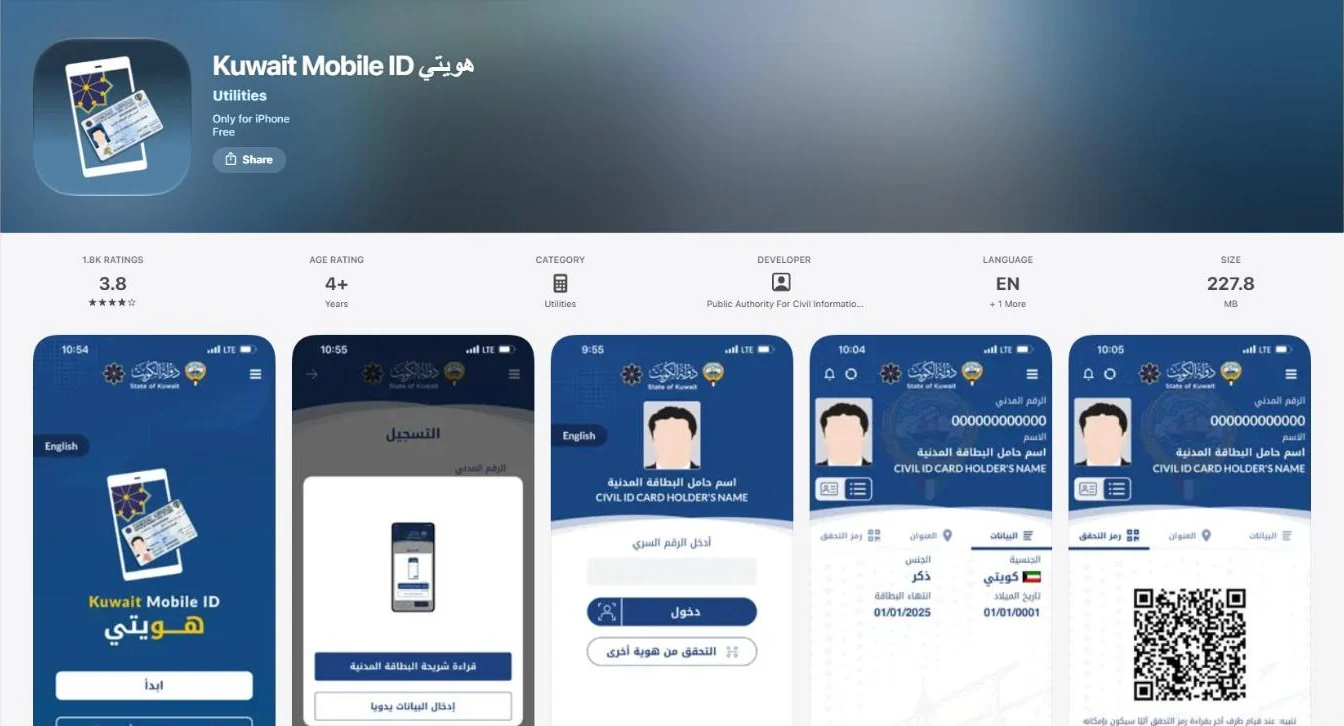
Your digital Civil ID then appears in the app. Don’t use 1234 or your birth year as the PIN.
Registering Without the Physical Card (New Expats)
New expats often have residency approved before the printed card is delivered. Since the May 2023 update (version 2.1.0), the app allows first-time registration for expats whose card has not been delivered yet: choose Online Registration using Mobile and use your civil number and passport number. Once the card arrives, open Manage, then Check for Updates, to refresh your card data, and consider registering by NFC to reach the High level.
How to Log In to Sahel with Kuwait Mobile ID
Sahel, the government services app, has no password of its own. Every login is approved in Kuwait Mobile ID:
- Step 1 Open Sahel, enter your civil number, accept the terms and tap Login.
- Step 2 Open Kuwait Mobile ID and enter your PIN.
- Step 3 Check the request: it should say Sahel and match what you just did.
- Step 4 Tap Authentication (approve), then return to Sahel.
This only works on the High or Verified level. From Sahel you can then book appointments, update your phone number, renew services and run checks such as a travel ban inquiry.
What You Can Do with Kuwait Mobile ID
- Prove your identity at government offices and private counters instead of showing the card.
- Log in to Sahel and other e-services, and approve requests.
- Sign documents electronically (Verified level).
- Authenticate online money transfers, now required by the Central Bank of Kuwait.
- Open telecom services: Zain and Ooredoo began accepting the app at branches in 2021.
- Check your card details, including the serial number under Address, then My Identity Serial Number.
- Find a PACI self-service machine near you.
- Keep government documents, such as residency and licence details, in one wallet.
Verifying Someone’s ID with the QR Code
Landlords, employers and shops can verify a person’s identity with the app instead of a photocopy. Both people need an account.
- Step 1 The cardholder opens the app, enters the PIN and taps QR code.
- Step 2 The verifier opens the app and taps Verify a Mobile ID.
- Step 3 The verifier scans the QR code; the person’s name, civil ID and address data appear.
Only share the QR code with someone you are dealing with in person.
Activating the Electronic Signature
On 3 August 2026, the Ministry of Justice and PACI urged everyone to activate the approved electronic signature service. It has full legal validity and the MOJ is rolling it out gradually for:
- Electronic notarization.
- Issuing and cancelling a power of attorney online.
- Setting up companies and commercial licences at the Ministry of Commerce and Industry.
- Signing some banking contracts remotely.
How to activate: citizens can activate it in the Kuwait Mobile ID app or at self-service kiosks; residents activate it at PACI self-service machines across the country. Registering at a machine also lifts your account to the Verified level.
Can You Travel with Kuwait Mobile ID?
In September 2020, PACI said expats with a digital Civil ID can use the app to prove residency and enter Kuwait, and it informed the airport, border crossings and airlines. Since 2019, the Civil ID has replaced the residency sticker at airports and borders.
Even so, carry your passport and physical Civil ID when you travel. Airline staff abroad may not accept a phone screen, and some users report they cannot log in to the app from certain countries. Kuwaiti citizens who travel to GCC countries on the ID card should carry the physical card, because travel within the GCC is based on the card itself.
Kuwait Mobile ID for Bank Transfers and Remittances
In 2026, the Central Bank of Kuwait (CBK) told exchange companies to authenticate every online overseas transfer through Kuwait Mobile ID. When you send money from an exchange company’s app, a request appears in Kuwait Mobile ID and you approve it. If your account is on the Medium level, this request cannot reach you, so register by NFC first.
Changing Your Phone or Mobile Number
Kuwait Mobile ID works on one phone only. When you change phones, install the app on the new phone and register again, preferably by NFC. Remove the app from the old phone before you sell or give it away.
To change the mobile number linked to your Civil ID, use Sahel: Services, then Public Authority for Civil Information, then Individual Services, then Update Phone Number. Enter the new number and tap Send. Keep the old SIM active until the change is done, because you need the app to approve the Sahel login.
Approval Request Scams: Only Approve What You Started
PACI has warned users twice, in August 2025 and again in September 2026, not to approve authentication requests they did not start. Fraudsters try to trick people into approving a request, for example one labelled “SIM card holder identity confirmation”, so they can open a SIM card, an account or a transfer in your name.
- Check the service provider’s name and the stated purpose before you tap.
- Reject any request that you did not start in the last minute.
- Never share your PIN or one-time passwords, even with someone claiming to be from PACI or a bank.
Common Kuwait Mobile ID Problems and Fixes
| Problem | Fix |
|---|---|
| NFC scan fails | Remove the phone case, turn on NFC, hold the card still at the top of the phone’s back |
| No approval request from Sahel | Your account may be Medium; register again by NFC |
| SMS code not received | Check the mobile number linked to your Civil ID; update it in Sahel |
| Selfie rejected | Use plain light, remove glasses and face the camera |
| Forgot PIN | Use Forgot PIN in the app or register again |
| App asks for update after card renewal | Open Manage, then Check for Updates |
| Cannot log in from abroad | Some countries are blocked; log in before you travel |
| App crashes | Update the app, restart the phone or reinstall |
| Expired Civil ID | Renew the card first, then register |
If a problem stays, call the PACI hotline 1889988. One guide also lists the government contact centre 101 for registration problems.
Tips to Keep Your Mobile ID Safe
- Download only the official app by PACI.
- Lock your phone with a PIN or fingerprint.
- Approve only requests you started yourself.
- Never share your PIN or SMS codes.
- Avoid public Wi-Fi for approvals.
- Keep the app and phone updated.
- Register by NFC to get authentication.
- Keep your mobile number current in Sahel.
After registering Hawyti, you can complete the electronic signature activation to sign requests digitally. Many PACI services also work inside the Sahel app.
More Civil ID and PACI guides
Every guide on the site, in one place.
FAQs About Kuwait Mobile ID
Is Kuwait Mobile ID the same as Hawyti?
Yes. Hawyti (هويتي) is the Arabic name of the Kuwait Mobile ID app by PACI; Sahel calls it My Identity.
Is Kuwait Mobile ID free?
Yes. The app is free on the App Store, Google Play and Huawei AppGallery.
What do I need to register on Kuwait Mobile ID?
Your Civil ID card or civil number, passport number (expats), a mobile number, an email address and a selfie. NFC lets you scan the card instead of typing.
What are the Medium, High and Verified levels?
Medium is manual registration with no authentication. High is NFC registration and adds authentication. Verified is set up at a self-service device and adds the electronic signature.
Why am I not getting Sahel approval requests?
Your account is probably on the Medium level. Register again by scanning your Civil ID chip with NFC to get the High level.
Can I register without my physical Civil ID?
Yes, for new expats. Since 2023 the app allows first-time registration before the card is delivered, using the civil number and passport number.
Can I use Kuwait Mobile ID on two phones?
No. It works on one phone only. Register again on the new phone.
How do I change my mobile number?
In Sahel: Public Authority for Civil Information, then Individual Services, then Update Phone Number.
Can I travel with Kuwait Mobile ID instead of my Civil ID?
PACI said in 2020 that expats can use it to prove residency when entering Kuwait. Still carry your passport and physical card.
Is Kuwait Mobile ID needed for money transfers?
Yes. The Central Bank of Kuwait requires it to authenticate online overseas transfers from exchange companies.
How do I activate the electronic signature?
Citizens can activate it in the app or at kiosks. Residents activate it at PACI self-service machines.
What should I do if I get a request I did not start?
Reject it. PACI warns users to approve only requests they started themselves.
Conclusion
Kuwait Mobile ID (Hawyti) is now the key to Sahel, e-signatures and online transfers, so set it up properly once. Here is the short version:
| If you want to | Do this |
|---|---|
| Register quickly | Scan your Civil ID by NFC (High level) |
| Log in to Sahel | Approve the request in Kuwait Mobile ID |
| Sign documents | Activate the e-signature (Verified level) |
| Change phones | Register again on the new phone |
- Register by NFC, because the Medium level cannot approve logins.
- Approve only what you started, and never share your PIN.
- Carry your physical card and passport when you travel.
Features and rules change with app updates, so confirm the latest steps in the app and on PACI’s pages. I based this guide on PACI and official app listings plus news references, last checked in October 2026.
Setting up Kuwait Mobile ID?
Find your best registration route and account level in seconds with our setup helper.